Open-source account routing and reliability tooling for OpenCode's Codex OAuth integration. It provides local session controls, a localhost dashboard, configurable routing, limit visibility, and failure recovery.


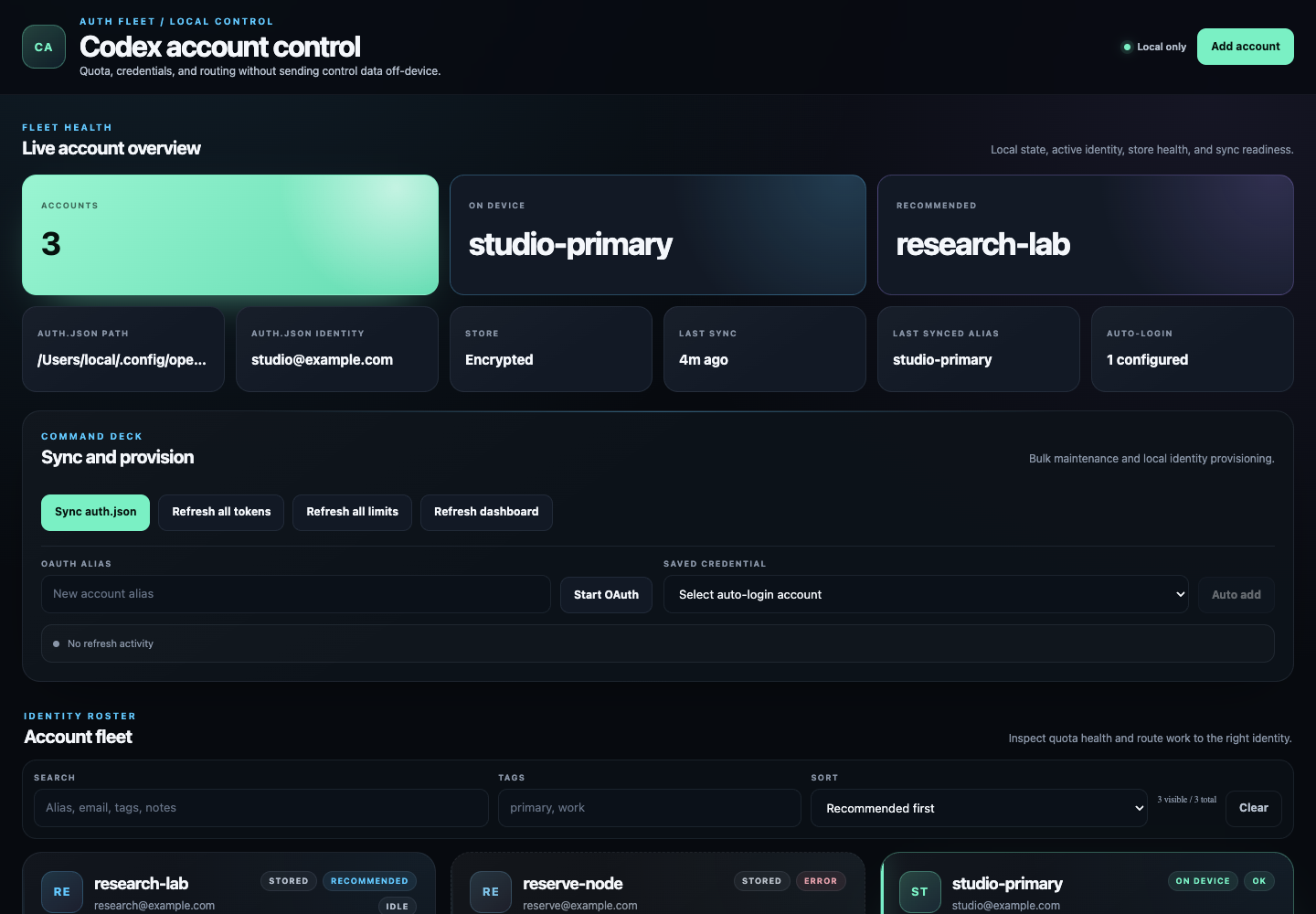
Screenshot data is illustrative and does not contain live credentials.
The localhost dashboard is built with React 19 and bundled into the package. It does not load a frontend framework or fonts from a CDN at runtime.
README.md-> primary operator and developer documentation for current behavior.SECURITY.md-> current dashboard boundary and credential-handling rules.OPENCODE_SETUP_1TO1.md-> current OpenCode, TUI, CLI, and React-dashboard setup.SANDBOX_QUICK_REF.md-> isolated local test environment.TEST_EXECUTION_PLAN.md-> current automated/manual validation boundaries.codextesting.md-> live/manual testing runbook.docs/README.md-> full docs index with authoritative vs historical references.
- Rotates requests across multiple ChatGPT/Codex OAuth accounts.
- Keeps a local account store with migration, validation, and atomic writes.
- Provides OpenCode TUI controls and a responsive React dashboard to manage accounts and limits.
- Supports force mode (pin one alias), account enable/disable, and re-auth.
- Filters accounts by health state and supports bulk metadata, lifecycle, limit-refresh, and removal actions.
- Supports settings-driven rotation strategy (
round-robin,least-used,random,weighted-round-robin). - Probes limits safely and keeps authoritative data quality rules.
- Gates non-core Antigravity features behind a feature flag.
- Core account routing, lifecycle, force, settings, limits, TUI, and React-dashboard features are implemented.
- Validation scripts cover unit, integration, dashboard asset smoke, failure, stress, sandbox, and short soak scaffolding.
- Web hardening fixes are in place:
- localhost-only bind enforcement
- loopback Host and Origin validation
- malformed JSON returns deterministic
400without process crash - bundled React assets use a restrictive content security policy
- Rate-limit handling sleeps an alias until reset when reset timing is known (
Retry-After, rate-limit window reset, or parsed provider reset text), instead of retrying that alias immediately. - Force mode is strict: when enabled, requests stay pinned to the forced alias and do not silently fall back to other aliases.
- Rotation strategy control is shown next to Force Mode in the dashboard.
- Strategy changes from dashboard settings are applied to runtime selection logic (not just persisted state/UI display).
- Force Mode and strategy interaction is explicit:
- while Force Mode is ON, normal strategy selection is paused
- clearing Force Mode restores the strategy captured when it was enabled
- Dashboard controls include visible guidance for Force Mode and rotation strategy behavior.
- Account enable/disable toggle is authoritative for eligibility in rotation.
round-robin-> cycle through healthy enabled accounts in order.least-used-> prefer the healthy enabled account with the lowest usage count.random-> pick randomly from healthy enabled accounts.weighted-round-robin-> split traffic by configured account weights (example:0.70/0.20/0.10≈70%/20%/10%).- Force Mode precedence -> when Force Mode is ON, strategy is paused; clearing force restores the pre-force strategy.
src/-> TypeScript sourceweb-ui/-> React dashboard source and stylesdist/-> generated backend and package outputdist/web-ui/-> Bun-bundled React dashboard JS, CSS, and source maptests/unit/-> unit teststests/integration/-> integration teststests/web-headless/-> dashboard HTTP/asset smoke tests (not browser E2E)tests/failure/-> failure-injection teststests/stress/-> stress/concurrency teststests/sandbox/-> sandbox isolation teststests/soak/-> soak scaffoldingdocs/-> QA and phase documentation (seedocs/README.mdfor canonical/historical split)IMPLEMENTATION_PLAN.md-> historical phased plan with a current React addendumTEST_EXECUTION_PLAN.md-> required test order and gatescodextesting.md-> live testing TODO for Codex CLI sessionsauto-login/-> Python OAuth automation helpers for authorized accounts
- Bun 1.3+
- OpenCode CLI 1.18.4+
- ChatGPT/Codex OAuth accounts
Install both the OpenCode server and TUI targets from npm:
opencode plugin @nguyenthdat/opencode-multi-auth-codex@latest --globalQuit and restart OpenCode after installation. In the OpenCode TUI, run /codex
or open the command palette and select Codex accounts from the
Suggested section. The TUI supports:
- listing account status, plan, quota, and health
- adding an account through browser OAuth
- re-authenticating accounts and refreshing OAuth tokens
- checking one account or all accounts
- selecting the account stored in the device Codex
auth.json - enabling/disabling an account
- editing account tags and notes
- forcing one account for up to 24 hours or returning to rotation
- removing an account from the local store
If you prefer config-based installation, OpenCode also supports:
{
  "plugin": ["@nguyenthdat/opencode-multi-auth-codex@latest"]
}
Package:
opencode plugin ... installs the plugin into OpenCode's package cache, but it
does not add the package binary to your shell PATH. Install the package globally
when you also want commands such as opencode-multi-auth add personal:
bun add --global @nguyenthdat/opencode-multi-auth-codex@latestIf Bun's global binary directory is not already on PATH:
export PATH="$HOME/.bun/bin:$PATH"Verify the command and add an account:
command -v opencode-multi-auth
opencode-multi-auth --help
opencode-multi-auth add personal
npm can be used instead of Bun:
npm install --global @nguyenthdat/opencode-multi-auth-codex@latest
opencode-multi-auth add personalUse this if you want the repo head instead of the latest npm release:
opencode plugin github:nguyenthdat/opencode-multi-auth-codex --global{
"plugin": ["github:nguyenthdat/opencode-multi-auth-codex"]
}OpenCode support:
- the plugin backfills
gpt-5.6-sol,gpt-5.6-terra, andgpt-5.6-luna - the plugin also backfills standalone
gpt-5.6-sol-fast,gpt-5.6-terra-fast, andgpt-5.6-luna-fastmodel IDs - reasoning levels remain OpenCode variants on each model, not separate model IDs
- each GPT-5.6 base and standalone fast model exposes
none,low,medium,high,xhigh, andmaxreasoning variants - GPT-5.6 base models do not expose a nested
fastvariant; select the corresponding standalone-fastmodel instead maxmaps to OpenAI's strongest supported request effort,xhigh- OpenCode builds that validate model IDs before plugin config is applied may still reject a direct GPT-5.6 family selection
- in that case, keep selecting a previous accepted model such as
openai/gpt-5.5oropenai/gpt-5.4and enable latest-model mapping:
export OPENCODE_MULTI_AUTH_PREFER_CODEX_LATEST=1gpt-5.5andgpt-5.4remain available with their existing nestedfastvariants and can be selected or used as rollback targets- disable runtime model injection only if you explicitly want that behavior off:
export OPENCODE_MULTI_AUTH_INJECT_MODELS=0Update existing installs:
- package install: rerun
opencode plugin @nguyenthdat/opencode-multi-auth-codex@latest --global - GitHub install: rerun
opencode plugin github:nguyenthdat/opencode-multi-auth-codex --global - restart OpenCode after updating the plugin
- if your install is pinned to a specific tag/commit, bump it explicitly before testing new models
git clone https://github.com/nguyenthdat/opencode-multi-auth-codex.git
cd opencode-multi-auth-codex
bun install --frozen-lockfile
bun run build# Install the shell command if you have only run `opencode plugin` so far
bun add --global @nguyenthdat/opencode-multi-auth-codex@latest
# Add accounts
opencode-multi-auth add personal
opencode-multi-auth add work
# Check status
opencode-multi-auth status
# Start dashboard
opencode-multi-auth web --host 127.0.0.1 --port 3434Open http://127.0.0.1:3434.
Alternatively, restart OpenCode and run /codex to manage and check accounts
without leaving the OpenCode TUI.
The auto-login/ directory contains a standalone Python script that automates the OAuth login flow for accounts you own. It prefers CloakBrowser when installed and falls back to regular Playwright:
- Opens OpenAI auth page
- Enters email/password and a TOTP authenticator code when requested
- Can still read an email one-time code from Outlook Web
- Uses SMSPool only when OpenAI presents a phone verification challenge
- Polls SMSPool's recommended
/request/activeendpoint and retries cancellation of an unused order on failure - Deduplicates credential rows and stored accounts by normalized email
- Clicks through the consent page
- Completes a dashboard-owned OAuth callback or writes directly to the current TypeScript plugin store
- Python 3.10+
- An SMSPool API key is needed only if an account receives a phone challenge.
Install the Python dependencies from the bundled requirements file:
uv venv
uv pip install -r auto-login/requirements.txt
uv run python -m cloakbrowser install
The requirements include CloakBrowser, Playwright, and python-dotenv. To use the regular Playwright fallback, also install its stock Chromium binary:
uv run playwright install chromium-
Create a private JSON credentials file:
install -m 600 auto-login/credentials.example.json auto-login/credentials.json
-
Edit
auto-login/credentials.jsonwith your accounts:{ "defaults": { "chatgpt_password": "SharedPasswordIfAny", "smspool": { "country": 1, "service": 671, "pricing_option": 0, "max_price": "0.50", "timeout_seconds": 180, "max_orders": 3 } }, "accounts": [ { "id": "acc-1", "email": "your-email@outlook.com", "outlook_password": "your-outlook-password", "chatgpt_password": "your-chatgpt-password", "totp_secret": "JBSWY3DPEHPK3PXP", "enabled": true } ] }defaults.chatgpt_passwordis used when an account doesn't specify its own.outlook_passwordis optional and only used to read login codes from Outlook inbox.totp_secretis the Base32 authenticator secret, not the current six-digit code.- SMSPool service
671isOpenAI / ChatGPTin the official SMSPool collection. - Set
enabled: falseto skip an account without removing it.
The standalone helper reads this file by default. The React dashboard reads
~/.config/opencode-multi-auth/credentials.jsonunlessOPENCODE_MULTI_AUTH_AUTO_LOGIN_CREDENTIALS_FILEoverrides it. To reuse the same source-checkout file when launching the dashboard:export OPENCODE_MULTI_AUTH_AUTO_LOGIN_CREDENTIALS_FILE="$PWD/auto-login/credentials.json"
-
Alternatively, create a private pipe-delimited account file:
install -m 600 auto-login/accounts.example.txt auto-login/accounts.txt
Its format is:
|email|password|2mfa secret key|
|one@example.com|password-one|JBSWY3DPEHPK3PXP|
|two@example.com|password-two|JBSWY3DPEHPK3PXP|
Blank lines, comments beginning with
#, and optional row numbers such as1. |email|password|secret|are accepted. -
Create a private root
.envfile and set the SMSPool key:install -m 600 .env.example .env
Set
SMSPOOL_API_KEY=...in.env. The script loads onlySMSPOOL_*,OPENCODE_MULTI_AUTH_PROXY*, andOPENCODE_MULTI_AUTH_DEACTIVATED_FILEfrom this file and does not override a value already exported in the shell. Optional environment overrides areSMSPOOL_COUNTRY,SMSPOOL_SERVICE,SMSPOOL_POOL,SMSPOOL_MAX_PRICE,SMSPOOL_PRICING_OPTION,SMSPOOL_AREA_CODE,SMSPOOL_EXCLUDE,SMSPOOL_TIMEOUT, andSMSPOOL_MAX_ORDERS. Each order is hard-capped at 180 seconds; the script confirms cancellation/refund before trying a different number.
# Check a pipe-delimited account list
uv run python auto-login/auto_login.py \
  --credentials-file auto-login/accounts.txt --check

# Login enabled accounts not already present in accounts.json
uv run python auto-login/auto_login.py \
  --credentials-file auto-login/accounts.txt --browser cloak

# Explicitly refresh accounts whose normalized email already exists
uv run python auto-login/auto_login.py \
  --credentials-file auto-login/accounts.txt --browser cloak --force

# Login a specific account by index
uv run python auto-login/auto_login.py \
  --credentials-file auto-login/accounts.txt --account 0

# Login a specific account by email
uv run python auto-login/auto_login.py \
  --credentials-file auto-login/accounts.txt --email user@example.com

# Run with visible browser (for debugging)
uv run python auto-login/auto_login.py \
  --credentials-file auto-login/accounts.txt --browser cloak --visible

# Force the original Playwright path
uv run python auto-login/auto_login.py \
  --credentials-file auto-login/accounts.txt --browser playwright

# Override the configured proxy for one run (credentials remain in .env)
uv run python auto-login/auto_login.py \
  --credentials-file auto-login/accounts.txt --browser cloak \
  --proxy http://proxy.example.com:3128

# Temporarily disable the configured proxy
uv run python auto-login/auto_login.py \
  --credentials-file auto-login/accounts.txt --browser cloak --no-proxy

# Run the standalone helper unit tests
uv run --with 'python-dotenv>=1.2.1,<2' \
  python -m unittest auto-login/test_auto_login.py
Standalone direct-store mode writes the current v2 store at
~/.config/opencode-multi-auth/accounts.json and honors
OPENCODE_MULTI_AUTH_STORE_DIR / OPENCODE_MULTI_AUTH_STORE_FILE. Existing
accounts from the former
~/.config/opencode/opencode-multi-auth-codex-accounts.json array store are
merged by normalized email. For an encrypted store, use /codex, the plugin
CLI, or dashboard-assisted auto-login instead of direct Python writes.
Before opening OAuth, auto-login compares normalized emails against the current
store and skips matches. Use --force only when an existing account's tokens
must be refreshed. Dashboard-assisted callbacks also require the authenticated
identity to match the selected credential email before any store write.
Browser traffic can use an HTTP(S) or SOCKS5 proxy configured in
.env; local callback addresses are always added to the bypass list. Proxy
credentials are never included in logs. Chromium requires authenticated proxies
to use HTTP(S); SOCKS5 is supported only without authentication. When OpenAI returns
account_deactivated, the script records only the email and detection metadata
in ~/.config/opencode-multi-auth/deactivated-accounts.json, atomically removes
that credential from the input file, removes a matching plaintext store account,
and skips quarantined emails on later runs.
OpenAI Auth                    Outlook Web                  Local Server
    |                              |                            |
    |  1. Enter email              |                            |
    |  2. Click "one-time code"    |                            |
    |  ----sends OTP email-------> |                            |
    |                              |  3. Login to Outlook       |
    |                              |  4. Read OTP from inbox    |
    |  5. Enter OTP code           |                            |
    |  6. Click Continue (consent) |                            |
    |  ----redirect callback-----> | ----code via HTTP GET----> |
    |                              |                            |  7. Capture code
    |                              |                            |  8. Exchange for tokens
    |                              |                            |  9. Complete dashboard callback or current-store write
The script generates a PKCE challenge compatible with the OAuth flow. In
dashboard-assisted mode, TypeScript owns the callback and updates the current
plugin store. In standalone mode, Python starts a local server on port 1455
and writes the same v2 account-map schema used by the TypeScript plugin. Legacy
array-store accounts are imported idempotently without replacing an existing
email entry. A standalone account without an explicit alias receives the next
available codex-NN name.
Outlook login often shows interstitial pages after password entry:
| Page | Handled by |
|---|---|
| "Stay signed in?" | Auto-clicks "Yes" |
| "Let's protect your account" | Auto-clicks "Skip for now" |
FIDO/Passkey creation (/fido/create) |
Auto-clicks "Not now" / "Cancel" |
| Any other blocker | Force-navigates to inbox |
--visiblemode shows the browser so you can see exactly where the flow gets stuck.- Debug screenshots are saved as
auto-login/debug_<user>_<step>.pngon failure. - SMSPool order errors include the API's HTTP status and message but never print the API key.
- No phone challenge means no SMSPool order is purchased.
- Phone challenge without
SMSPOOL_API_KEYstops with an actionable error instead of buying a number implicitly. --auth-urlphone retry requires restarting login from the dashboard because a rejected/expired phone order needs a fresh OAuth URL.- SSL errors on macOS: the script currently uses
ssl._create_unverified_context()for selected remote token/userinfo requests. This compatibility workaround weakens TLS authentication; fixing the local CA trust chain is preferred. - Port 1455 in use: kill any process using that port, or change
REDIRECT_PORTin the script. - Stale OTP codes: if the inbox has old verification emails, the script may pick up an expired code. Clear the inbox or wait for a fresh email.
Install the binary first with
bun add --global @nguyenthdat/opencode-multi-auth-codex@latest (or the npm
equivalent above). Installing only through opencode plugin does not expose the
CLI binary on your shell PATH.
opencode-multi-auth add <alias>-> add account via OAuthopencode-multi-auth remove <alias>-> remove accountopencode-multi-auth list-> list configured accountsopencode-multi-auth status-> basic account/token statusopencode-multi-auth path-> print store pathopencode-multi-auth web --host 127.0.0.1 --port 3434-> run dashboardopencode-multi-auth service install|disable|status-> systemd user service helpers
GET /api/stateGET /api/logsPOST /api/syncPOST /api/auth/startPOST /api/auto-login/startPOST /api/auto-login/addPOST /api/switchPOST /api/removePOST /api/account/metaPOST /api/token/refreshPOST /api/limits/refreshPOST /api/limits/stopGET /api/accountsPUT /api/accounts/:alias/enabledPOST /api/accounts/:alias/reauthGET /api/forcePOST /api/forcePOST /api/force/clearGET /api/settingsPUT /api/settingsGET /api/settings/feature-flagsPUT /api/settings/feature-flagsPOST /api/settings/resetPOST /api/settings/presetPOST /api/antigravity/refresh(feature-flag gated)POST /api/antigravity/refresh-all(feature-flag gated)
Dashboard auto-login endpoints also skip an email already present in the store
and return 409 AUTO_LOGIN_ACCOUNT_EXISTS. Send force: true, or use the
dashboard's Force update button, to refresh that account explicitly.
Account-level re-auth automatically uses an enabled saved auto-login credential when its normalized email matches the selected account. The callback is scoped to that alias and rejects a different authenticated email. If no matching saved credential is available, the dashboard falls back to the manual OAuth flow.
OPENCODE_MULTI_AUTH_STORE_DIR-> override store directoryOPENCODE_MULTI_AUTH_STORE_FILE-> override store file pathOPENCODE_MULTI_AUTH_CODEX_AUTH_FILE-> override Codexauth.jsonCODEX_SOFT_STORE_PASSPHRASE-> encrypt account store at restCODEX_SOFT_LOG_PATH-> override dashboard log pathOPENCODE_MULTI_AUTH_AUTO_LOGIN_SCRIPT-> override dashboard automation scriptOPENCODE_MULTI_AUTH_AUTO_LOGIN_CREDENTIALS_FILE-> override dashboard saved-credential fileOPENCODE_MULTI_AUTH_AUTO_LOGIN_PYTHON-> override Python executable used by the dashboard
OPENCODE_MULTI_AUTH_ROTATION_STRATEGY(settings source override; runtime rotation follows persisted dashboard settings)OPENCODE_MULTI_AUTH_CRITICAL_THRESHOLDOPENCODE_MULTI_AUTH_LOW_THRESHOLDOPENCODE_MULTI_AUTH_TOKEN_FAILURE_COOLDOWN_MSOPENCODE_MULTI_AUTH_PROBE_EFFORTOPENCODE_MULTI_AUTH_LIMITS_PROBE_MODELSOPENCODE_MULTI_AUTH_REFRESH_QUEUE_CONCURRENCYOPENCODE_MULTI_AUTH_USAGE_BASE_URLCODEX_CLI_BIN
OPENCODE_MULTI_AUTH_BROWSER-> chooseauto,cloak, orplaywrightOPENCODE_MULTI_AUTH_NO_SANDBOX=1-> disable the browser no-sandbox flag where supportedOPENCODE_MULTI_AUTH_PROXY-> HTTP(S) or SOCKS5 proxy URL for browser trafficOPENCODE_MULTI_AUTH_PROXY_USERNAME/OPENCODE_MULTI_AUTH_PROXY_PASSWORD-> proxy authenticationOPENCODE_MULTI_AUTH_PROXY_BYPASS-> comma-separated bypass hosts; local callback addresses are always includedOPENCODE_MULTI_AUTH_DEACTIVATED_FILE-> override the quarantined-account record pathSMSPOOL_CARRIER-> optional SMSPool carrier filter
OPENCODE_MULTI_AUTH_PREFER_CODEX_LATESTOPENCODE_MULTI_AUTH_CODEX_LATEST_MODELOPENCODE_MULTI_AUTH_INJECT_MODELSOPENCODE_MULTI_AUTH_TRUNCATIONOPENCODE_MULTI_AUTH_DEBUG
The plugin can route older Codex selections to the latest Codex backend model when you explicitly opt in.
Default behavior:
- exact model selection is preserved
Environment variables:
OPENCODE_MULTI_AUTH_PREFER_CODEX_LATEST=1enables mapping to the latest backend modelOPENCODE_MULTI_AUTH_CODEX_LATEST_MODEL=gpt-5.5overrides the mapping target, for example to roll back from the defaultgpt-5.6-solOPENCODE_MULTI_AUTH_DEBUG=1prints model mapping debug logsOPENCODE_MULTI_AUTH_INJECT_MODELS=0disables automatic runtime model backfill
For OpenCode builds that accept GPT-5.6 family IDs, select a standalone fast model such as openai/gpt-5.6-sol-fast, then choose its reasoning variant.
- the backend model stays
gpt-5.6-sol - the standalone fast model sets
serviceTier=priorityin its top-level options and every reasoning variant - reasoning remains a variant selection:
none,low,medium,high,xhigh, ormax - the base
gpt-5.6-solmodel no longer has a nestedfastvariant gpt-5.5andgpt-5.4keep their existing nestedfastvariants
Equivalent OpenCode model configuration:
{
  "provider": {
    "openai": {
      "models": {
        "gpt-5.6-sol-fast": {
          "options": {
            "reasoningEffort": "medium",
            "serviceTier": "priority"
          },
          "variants": {
            "max": {
              "reasoningEffort": "xhigh",
              "serviceTier": "priority"
            }
          }
        }
      }
    }
  }
}
For OpenCode builds that still reject GPT-5.6 family IDs, keep selecting openai/gpt-5.5 or openai/gpt-5.4 and set OPENCODE_MULTI_AUTH_PREFER_CODEX_LATEST=1. The plugin will send gpt-5.6-sol to the Codex backend.
See docs/gpt-5.4-fast-benchmark.md for a continued-session benchmark summary.
OPENCODE_MULTI_AUTH_ANTIGRAVITY_ENABLED
OPENCODE_MULTI_AUTH_NOTIFY=1enables optional completion/retry/error notifications. Notifications are off by default so they cannot delay normalopencode runlifecycle.OPENCODE_MULTI_AUTH_NOTIFY_SOUNDOPENCODE_MULTI_AUTH_NOTIFY_MAC_OPENOPENCODE_MULTI_AUTH_NOTIFY_NTFY_URLOPENCODE_MULTI_AUTH_NOTIFY_NTFY_TOKENOPENCODE_MULTI_AUTH_NOTIFY_UI_BASE_URL
- Dashboard host is loopback-only (
127.0.0.1,::1,localhost). - Non-loopback host bind is rejected.
- Host and browser Origin authorities must match loopback and the dashboard port.
- The dashboard has no authentication; any local process able to reach the port can call its APIs.
- Sensitive token patterns are redacted in logs.
- Store file permissions are restricted (
0o600). - Antigravity APIs are blocked when feature flag is off.
- See
SECURITY.mdfor credential-file, source-map, and local threat-model details.
bun install --frozen-lockfile
bun run lint
bun run build

bun run test:unit
bun run test:integration
bun run test:web:headless
bun run test:failure
bun run test:stress
bun run test:sandbox
bun run test:soak:48h
uv run --with 'python-dotenv>=1.2.1,<2' python -m unittest auto-login/test_auto_login.py
test:web:headless is an HTTP/asset smoke test; it does not execute React in a
browser. test:soak:48h currently runs a short scaffold with a 120-second test
timeout and is not evidence of a true 48-hour soak. See
TEST_EXECUTION_PLAN.md for browser and long-duration gates.
Use codextesting.md for the Codex CLI live-testing checklist and copy-paste command flow.
- If dashboard start fails with localhost error, check
--hostand use loopback only. - If a request returns
INVALID_JSON, verify payload body is valid JSON. - If an alias action returns
ACCOUNT_NOT_FOUND, refresh account list first. - If re-auth is blocked with
ACCOUNT_DISABLED, enable the account before re-auth. - If encrypted store appears locked, export
CODEX_SOFT_STORE_PASSPHRASEbefore launching.
- Edit backend/plugin code under
src/*and React dashboard code underweb-ui/*. - Never hand-edit
dist/*; runbun run buildafter either source tree changes. - Build before dashboard smoke tests so they inspect the current generated bundle.
- Keep manual/live tests sandboxed (temp HOME/store/auth paths).
- Every shipped update must use a new
package.jsonversion. Reusing a version leaves users on cached npm installs. - Prepare and validate the release on
main:
bun pm pkg set version=X.Y.Z
bun install --lockfile-only
bun run lint
bun run build
bun test
bun audit
git diff --exit-code -- dist
npm pack --dry-run- Commit and push the version/build changes, then create the matching tag:
git add package.json bun.lock dist
git commit -m "chore: release vX.Y.Z"
git push origin main
git tag -a vX.Y.Z -m "vX.Y.Z"
git push origin vX.Y.Z
The Release workflow validates the tag, runs CI and audit checks, packs the npm artifact,
publishes through npm Trusted Publishing with provenance, and creates the GitHub Release
with the package tarball and SHA-256 checksum. Re-run an existing tag with:
gh workflow run publish-npm.yml -f tag=vX.Y.Z- Users who want a pinned build can install a specific npm version:
{
  "plugin": ["npm:@nguyenthdat/opencode-multi-auth-codex@1.5.1"]
}- Users tracking
latestshould rerun the install command and restart OpenCode after a new package lands.
MIT